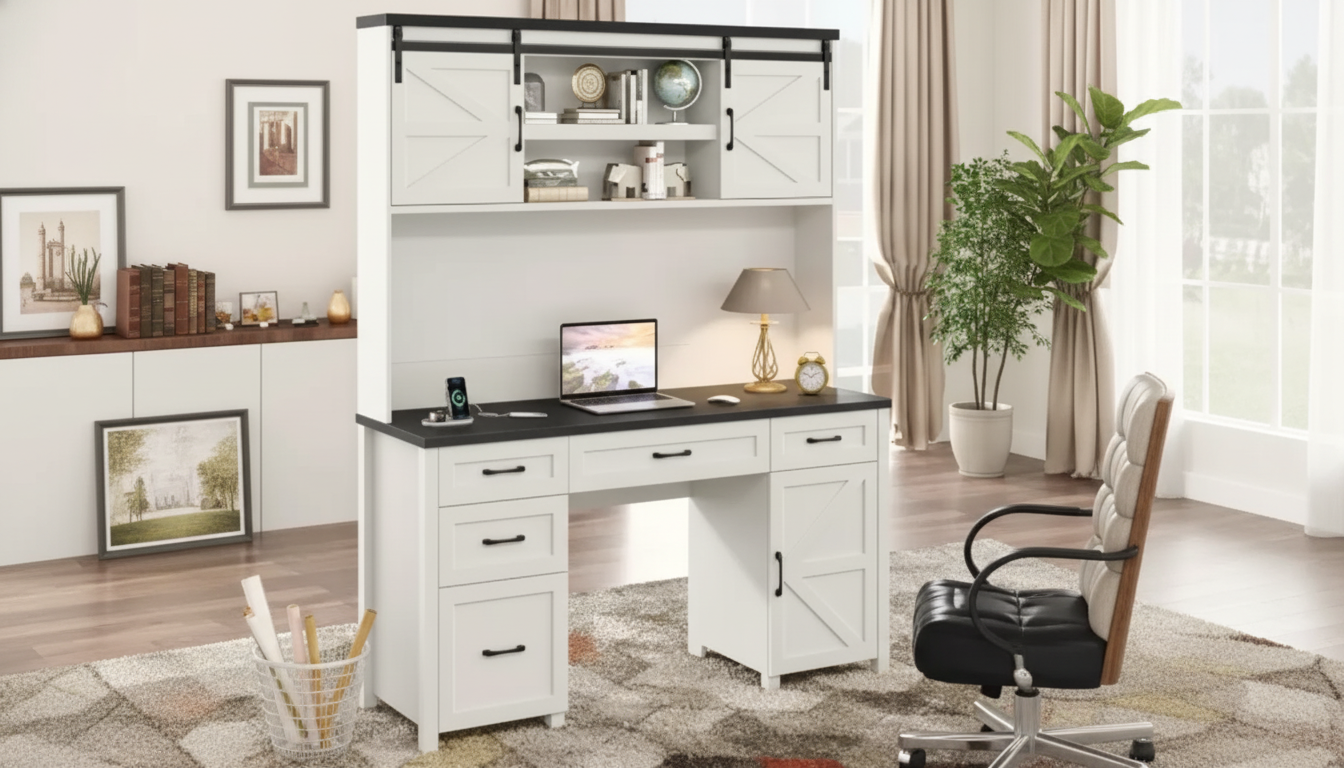
A farmhouse executive desk with a hutch brings the presence of a true “anchor” piece while solving day-to-day work-from-home friction: keeping essentials visible, corralling paper clutter, and powering devices without a nest of cords. The right setup makes it easier to stay organized and comfortable, especially in multi-use spaces like guest rooms, lofts, or dining-adjacent nooks where a cohesive workstation helps draw a clear line between work time and downtime.
Below are the practical details that tend to matter most—workspace sizing, storage layout, cable routing, and safe charging habits—so the desk fits the room and supports the routine.
Farmhouse styling paired with executive proportions has a grounded, substantial feel—more like a permanent workstation than a temporary table. That “settled” look can make a room feel finished, even when the space has to do double duty.
The hutch is the real efficiency boost. By moving frequently used items up to eye level, it reduces the urge to stack supplies and papers on the desktop. With fewer pileups, the main work surface stays open for a keyboard, notebook, or a clean writing area.
An integrated charging station is the other modern advantage. Instead of reaching behind furniture or adding a floor power strip, daily devices can charge at the desk, keeping the workspace more functional and less visually noisy.
Before choosing any executive-style desk with a hutch, measure the total footprint and plan for chair movement and walkways. A desk can technically “fit” while still feeling cramped if there’s not enough clearance behind the chair for easy sit-to-stand transitions.
Monitor placement deserves special attention with a hutch. Shelves can be a great way to center a display, but only if the monitor height allows a neutral neck posture and enough viewing distance. If the hutch shelf sits too low, a low-profile monitor stand or a monitor arm can help fine-tune height without sacrificing storage.
Think in task zones. Keep the center area reserved for computer work, one side for writing/reading, and designate a consistent spot for charging so cables don’t cross over your main work area. Lighting also changes with a hutch: it can cast shadows on the desktop, so consider a task lamp or under-shelf light when overhead lighting is the only source.
Finally, map outlet access and cable paths. A clean route to the wall outlet reduces tripping risk and prevents cords from being pinched behind heavy furniture. For workstation ergonomics guidance, OSHA’s computer workstation resource is a helpful reference: https://www.osha.gov/etools/computer-workstations.
| Room/Use Factor | What to Check | Why It Matters |
|---|---|---|
| Floor space | Desk footprint + space to pull chair out | Prevents cramped seating and improves circulation |
| Chair clearance | Knees/armrests clear drawers and supports | Reduces posture strain and bumps during long sessions |
| Monitor placement | Eye level near top third of screen; comfortable distance | Helps minimize neck and eye fatigue |
| Cable route | Safe path to outlet; no pinching behind furniture | Improves safety and reduces cord damage |
| Storage access | Hutch shelves reachable while seated/standing | Keeps daily items convenient and desktop clean |
Charging stations are convenient, but don’t overload them. Follow the desk manufacturer’s power guidance, use certified chargers, and keep ventilation around adapters clear. General consumer guidance on device charging and electronics care can be found at the FCC: https://www.fcc.gov/consumers/guides. For a broader overview of electrical safety and certification, UL Solutions is a reliable source: https://www.ul.com/.
The Farmhouse Executive Desk with Hutch and Charging Station is designed as a single workstation that combines a generous desktop, vertical hutch storage, and integrated charging for everyday devices. It’s a strong fit for home offices that need more structure than a simple writing desk while keeping a warm, farmhouse-inspired look.
| Item | Details |
|---|---|
| Product | Farmhouse Executive Desk with Hutch and Charging Station |
| Price | 803.49 USD |
| Availability | In stock |
| MPN | 83491 |
| SKU | 14:200844061 |
Yes, as long as the hutch shelf heights allow the monitors to sit at a comfortable eye level and viewing distance. If clearance is tight, a monitor arm or low-profile riser can help position both screens without sacrificing the desktop work area.
It can be, but safety depends on following the desk’s manufacturer guidance, avoiding overload, and using certified chargers and undamaged cords. Keep adapters ventilated (not buried under papers), and unplug or replace any cable that shows fraying, heat damage, or loose connections.
Use short cables sized to your setup, route them along the back edge, and secure them with adhesive clips or a sleeve so slack doesn’t spill onto the work surface. Label common cords and keep spares in a small tech bin on the hutch to avoid random cables collecting on the desktop.
If you have any questions, here are some useful links:












Leave a comment